Last 60 minutes
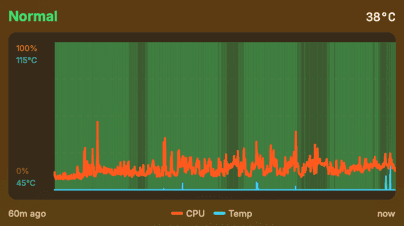
See the recent thermal timeline with CPU load and temperature trend, so short spikes have context.
A tiny thermal assistant for fanless MacBook Airs.
Know when your Air is heating up, slowing down, and why.
macOS 13+ (Ventura) · M1-M5 MacBook Air required
Detect. Explain. Recommend.
Fanless MacBook Airs are fast in short bursts, but long builds, exports, local AI runs, clamshell mode, and external displays can raise thermal pressure over time. SizzleAir watches the trend, checks the context, and turns that into one clear next step.
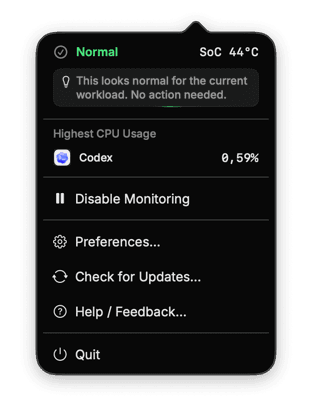
It does not cool, tune, or take over your Mac. It combines local thermal signals with workload context so the recommendation is grounded, not guessed.
Uses macOS thermal state and pressure as the baseline.
Tracks whether heat is rising, stable, or cooling.
Adds display, clamshell, and workload context before it explains anything.
Shows the app or process putting the most load on CPU right now.
See the recent thermal timeline with CPU load and temperature trend, so short spikes have context.
Shows how much of the last hour was normal, fair, serious, or critical.
Tracks today's monitoring time, thermal episodes, and the app most often adding load.
Many Mac utilities can show a wall of sensor readings. SizzleAir focuses on the question a fanless Air owner actually has: is this normal, why is it happening, and what can I do before throttling takes over?
Useful for experts. Still, a pile of readings can leave you asking whether 90°C is fine right now.
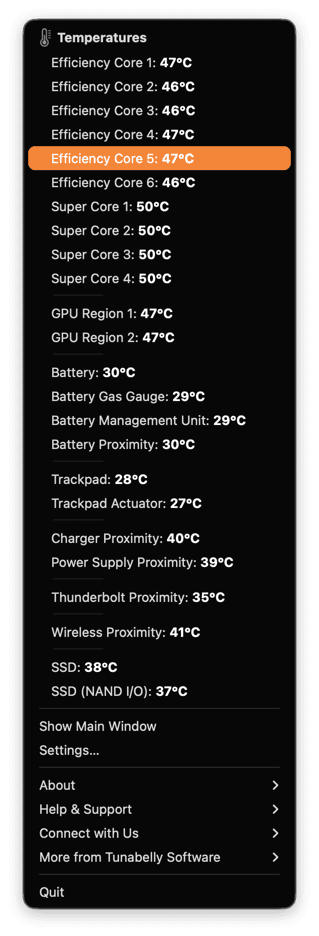
Replace
Detect → Explain → Recommend, so you can act before your Air spends the session throttling.
Detect
SizzleAir watches thermal pressure, CPU load, and sustained heat trends.
Explain
SizzleAir checks whether heat matches what your Mac is doing right now.
Recommend
You get one practical next step, not a wall of charts.
One tiny purchase. One favorite coffee theory.
Priced at the latestexchange rate. exchange rate.
Helps an indie developer buy coffee, pay the electric bill, and keep shipping tiny MacBook Air tools.
Download for MacOne-time purchase. Taxes may be added at checkout.
June 12, 2026
May 19, 2026
May 16, 2026
A tiny menu bar thermal assistant for fanless MacBook Airs. It detects thermal pressure, explains likely causes, and suggests one safe next step.
No. It does not cool your Mac, tune the system, or take over performance. It translates local thermal signals into a plain status, likely cause, and practical recommendation.
Nope. SizzleAir is built to stay lightweight. It watches thermal state, recent history, and top CPU usage without becoming another heavy workload.
SizzleAir is built and tested for Apple Silicon MacBook Air running macOS 13 or newer. Intel Macs and Windows are not supported.
Maybe, but that is not the v1 promise. It may run on some MacBook Pro models because macOS exposes system thermal state broadly, but MacBook Pro is not the target for v1.
Yes. You can keep SizzleAir quiet and simple: use the menu bar status, disable monitoring when needed, and rely on quiet notifications only for sustained serious or critical thermal pressure and recovery.
SizzleAir is not a full sensor wall. It uses macOS thermal state, available temperature and pressure signals, trends, and local context. Exact sensor names and readings can vary by Mac and macOS version.
Use the Polar customer portal linked on this page. Your license supports 3 activations.
Because SizzleAir is a digital product, refunds are generally not available once a license has been issued and delivery or use has started, except where required by law. If SizzleAir does not function on a supported Mac, email contact@sizzleair.app within 14 days of purchase and we will troubleshoot first.
Email contact@sizzleair.app. We aim to respond to support requests within 48 hours.
 Codex
Codex